Set up the AgencyZoom integration
Connect RiskAdvisor to AgencyZoom and set your default pipeline, stage, location, and send settings.
Written By David Watson
Last updated About 2 hours ago
Note: The AgencyZoom integration is available on Growth and Premium plans.
Connect RiskAdvisor to AgencyZoom so new leads land in the right pipeline, stage, and location.
Before you begin
You must be an Account Owner or Admin.
Have your AgencyZoom username and password ready.
Connect your account
Go to Integrations → AgencyZoom.
Check Has AgencyZoom Integration.
Enter your AgencyZoom Username and password.
Click Save.
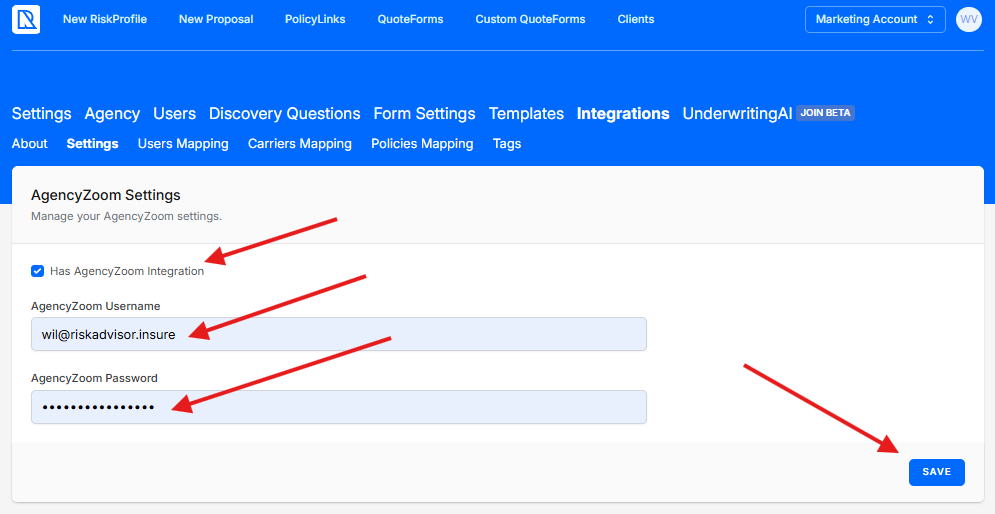
You only need to connect once. Reconnect if your AgencyZoom login or permissions change.
Choose single or multiple pipelines
Single Pipeline: every team member sends leads to the same pipeline.
Multiple Pipelines: you set each team member's pipeline on the Users Mapping tab.
Set your default pipeline and stage
Select a Pipeline.
Select a Pipeline Stage.
New leads from RiskAdvisor start in this stage. Agents can change the pipeline, stage, tags, and location for one RiskProfile on the Review & Send step.
Note: Prospect Found and Prospect Not Found stages are set on each legacy QuoteForm, not on this page. See Set up AgencyZoom in legacy QuoteForms.
Set a default location
Select a Location for leads that RiskAdvisor creates or updates.
One office: select that office.
Multiple offices: this location is the team fallback. Set each user's location on the Users Mapping tab.
Turn on optional settings
Two more settings sit on the same page.
Enable Quick Send: send a client to AgencyZoom before the RiskProfile is complete. You can turn it on only after you set a Pipeline and Pipeline Stage and match every user.
Send RiskProfile as HTML Note: add a formatted RiskProfile note to the AgencyZoom lead.
Click Save when you finish.
How data moves between the two systems
RiskAdvisor sends leads, notes, and files to AgencyZoom. Changes you make in AgencyZoom do not flow back into RiskAdvisor.
There are two exceptions:
You can search AgencyZoom leads and customers when you start a RiskProfile.
When AgencyZoom assigns a new lead to a user, RiskAdvisor records that user.
FAQs
Who can set up or change the AgencyZoom integration?
Who can set up or change the AgencyZoom integration?
Only Account Owners and Admins.
Can different users send to different pipelines?
Can different users send to different pipelines?
Yes. Choose Multiple Pipelines, then set each user's pipeline on the Users Mapping tab.
What happens if the client already exists in AgencyZoom?
What happens if the client already exists in AgencyZoom?
If RiskAdvisor has sent this client before, it updates the existing AgencyZoom lead instead of creating a new one.
Can I choose a pipeline for one RiskProfile?
Can I choose a pipeline for one RiskProfile?
Yes. On the Review & Send step, choose a different pipeline, stage, tags, or location for that RiskProfile. This shipped from Reconfigure Handling of Multiple Pipelines for AgencyZoom.
How do I change which location leads go to?
How do I change which location leads go to?
Change the Location field on this page, or set per-user locations on the Users Mapping tab.
Related Articles
Was this helpful?
Still need help? Ask the team