Send QuoteForm Submissions to AgencyZoom
Written By David Brower
Last updated 4 months ago
Control exactly how each QuoteForm sends data to AgencyZoom — or choose not to send at all. You can now toggle whether Risk Profiles generated from a QuoteForm will sync to AgencyZoom, and customize the pipeline, tags, assigned user, and automation stage per form.
✅ Who can do this: All users⚙️ Where: QuoteForms > [Gear Icon] Settings > AgencyZoom Integration
How To Do It 🚀
Turn AgencyZoom Sync On or Off Per QuoteForm
Go to the QuoteForms page.
Click the Settings gear icon for the QuoteForm you want to configure.
In the AgencyZoom Integration section:
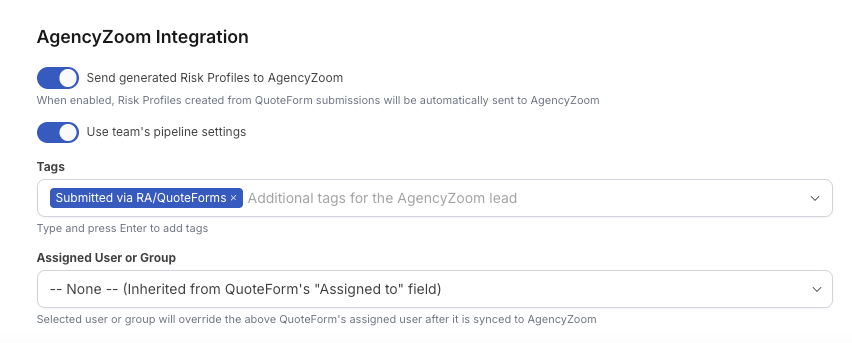
Toggle Send generated Risk Profiles to AgencyZoom ON or OFF.
If OFF, submissions from this QuoteForm will not sync to AgencyZoom.
If ON, additional options will appear.
Make a QuoteForm Send to a Different Pipeline in AgencyZoom
Ensure Send generated Risk Profiles to AgencyZoom is ON.
Toggle Use team's pipeline settings OFF to customize the behavior.
Choose a specific:
Pipeline
Automation Stage
Assigned User or Group
Add optional Tags for the AgencyZoom lead.
If you leave assigned user/group as -- None --, the system will inherit the QuoteForm's "Assigned to" value.
Assigned User or Group
You are able to assign the AgencyZoom Lead that is generated from this QuoteForm submission to a specific Team Member or a Lead Assignment Group.
AgencyZoom Lead Source
You can assign a specific AgencyZoom Lead Source to this QuoteForm. Any submissions received from this QuoteForm will have the related Lead Source attached. You can always change this at a later point.
Form Abandonment Tag
Any abandoned lead sent to AgencyZoom from a QuoteForm submission will have the Abandoned Lead tag applied. With this, you can set up a custom Lifecycle Automation based on these leads. From AgencyZoom, Help Article: Building Automation for Sales Pipelines
What Gets Sent to AgencyZoom
When a client submits a QuoteForm, RiskAdvisor creates a lead in AgencyZoom and populates it with the following data.
Lead Routing & Assignment
💡 Tip: Abandoned submissions get an ABANDONED LEAD tag instead of SUBMITTED VIA QUOTEFORM, so you can build separate automations for incomplete leads.
Auto Insurance: Drivers, Vehicles & Opportunities
If the submission includes auto insurance, AgencyZoom will also receive the driver and vehicle records from the profile. One opportunity is created per insurance type included in the submission.
⚠️ Note: Drivers, vehicles, and opportunities are created as a follow-on step after the lead. They may take a moment to appear.
What appears in the lead note 📋
In addition to creating or updating the lead record with the fields listed above, RiskAdvisor also adds a formatted note to the AgencyZoom lead every time a QuoteForm is submitted.
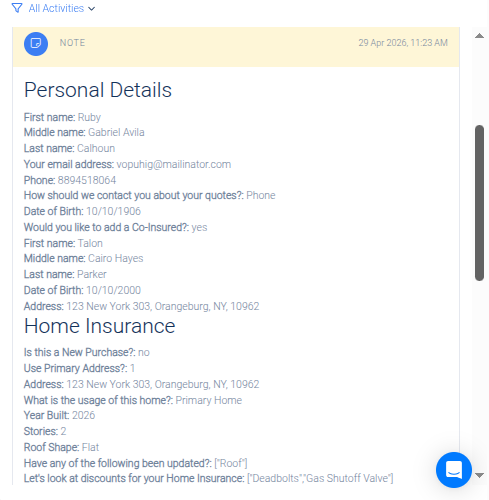
Lead fields vs. the submission note
There are two distinct payloads sent to AgencyZoom when a QuoteForm is submitted:
Lead fields — structured data mapped directly to AgencyZoom lead properties (name, email, phone, address, pipeline, tags, etc.). These are covered in the What Gets Sent to AgencyZoom section above.
Submission note — a formatted note attached to the lead containing the full content of the QuoteForm response, grouped by section. This gives your team visibility into every answer the client provided, even fields that don't map to a standard AgencyZoom lead property.
📌 Example: A client submits an auto QuoteForm. AgencyZoom receives the lead with their name, email, phone, and address populated in the lead record. Separately, a note is added to that lead showing all sections of the form — Insured Info, Vehicle Details, Driver Details — with each question and answer laid out in order.