How a submission becomes a client and RiskProfile
What happens after a client submits a Custom QuoteForm, including client matching, assignment, and where to find submissions.
Written By David Watson
Last updated About 2 hours ago
When a client submits a Custom QuoteForm, RiskAdvisor creates a RiskProfile and tells your team. Here is what happens in between.
What happens when a form is submitted
The client submits the form.
RiskAdvisor matches the client by email, or creates a new client.
RiskAdvisor creates a RiskProfile from the client's answers.
Everyone on the form's notification list gets an email.
If AgencyZoom sending is on for the form, the lead goes to AgencyZoom.
The submission appears in the form's submissions list.
How client matching works
RiskAdvisor uses the client's email address to match the submission to an existing client.
Email matches an existing client: the submission links to that client's record.
No match found: RiskAdvisor creates a new client record.
Note: Email is always required on Custom QuoteForms, so every submission can be matched to a client.
Assignment
The new RiskProfile belongs to the team member in the form's Assigned team member setting. If no one is selected, it goes to your agency's team owner.
To change who gets the email, update the form's notification recipients. See Customize a QuoteForm.
Find a submission
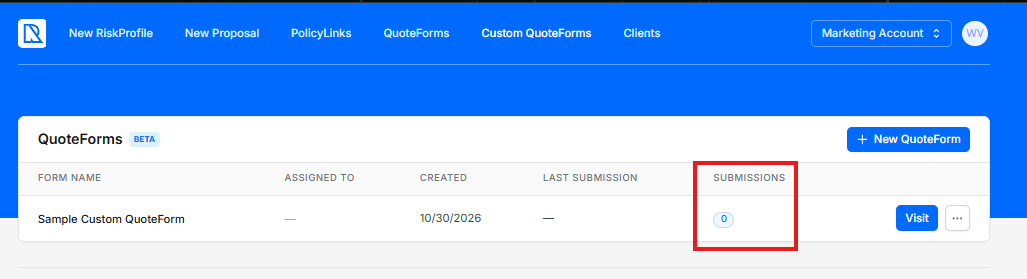
Go to the Custom QuoteForms list. Each form shows its submission count.
Click the submission count to open the form's submissions [needs verification].
Click a submission to see the client's answers.
Click Link client [needs verification] to connect the submission to a client record, if needed.
Note: Custom QuoteForms do not send form abandonment notifications yet. You only hear about clients who finish the form.
Related Articles
Was this helpful?
Still need help? Ask the team