Join the Custom QuoteForms beta
Turn on Custom QuoteForms for your whole agency, who can opt in, and what is not available in the beta yet.
Written By David Watson
Last updated About 2 hours ago
Turn on Custom QuoteForms for your whole agency from the QuoteForms page. It takes about a minute.
Before you begin
Only a team owner or team admin can opt in. Editors see the beta banner but cannot opt in.
Opting in turns on Custom QuoteForms for every member of your team right away.
Your legacy QuoteForms keep working. Opting in does not change or move them.
Opt in to the beta
Go to QuoteForms.
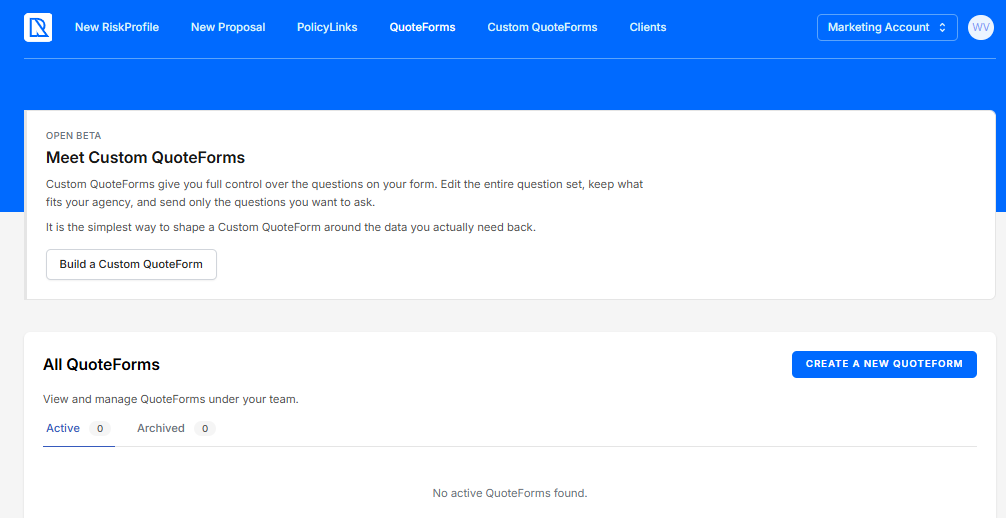
Find the beta banner at the top of the page.
Click the Build a Custom QuoteForm button on the banner.
Open Custom QuoteForms from the navigation.
Note: If you are an editor, ask your team owner or an admin to opt in. Once they do, you get access too.
Create your first Custom QuoteForm
On the Custom QuoteForms page, click + New QuoteForm.
Enter a name and select the lines of business to include.
Click Create QuoteForm. The form builder opens.
To choose questions and set up the form, see Customize a QuoteForm.
Tip: Keep your legacy QuoteForm on your website while you test. Custom QuoteForms work by link only for now.
What is not in the beta yet
These legacy features have not moved to Custom QuoteForms yet:
Embedding the form on your website. Share the form's link instead.
Form abandonment notifications.
Property and auto data prefill.
Allowed States, Bot Protection, and reCAPTCHA.
The TCPA disclosure and SMS marketing checkbox.
AgencyZoom pipeline and stage per form, custom tags per form, the form note, and the abandoned lead tag.
EZLynx and PolicyLink.
Adding your own questions and editing question labels or answer choices.
The QuoteForms page lists features that have not moved yet, with links to upvote them [needs verification].
FAQ
Can I turn the beta off?
Can I turn the beta off?
Not from the app. Email support@riskadvisor.insure and we can turn it off for your team.
Do my legacy QuoteForms change?
Do my legacy QuoteForms change?
No. Legacy forms, their links, and their settings stay the same.
Why does it say Custom QuoteForms?
Why does it say Custom QuoteForms?
The name separates the new forms from legacy forms during the beta. They will be called QuoteForms once the legacy version is retired.
Related Articles
Was this helpful?
Still need help? Ask the team